Will your old games work on a new console? The check to run before you buy
Backward compatibility is three promises, not one: the game, the save and the accessory. What Sony, Microsoft and Nintendo each promise, and where it breaks.
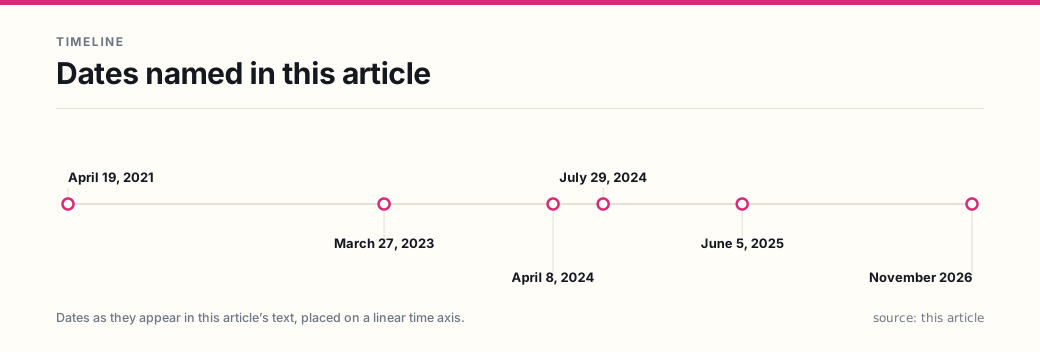
You are deciding whether to replace a console, and the question you are actually asking is narrower than “is it backward compatible”. Backward compatibility means a new console can run software released for an older one — and that single sentence contains three separate promises: the game runs, your save file survives, and the controller or accessory the game needs still works. Only the first is close to unconditional on any of the three consoles sold in the United States in November 2026.
That distinction decides money. A shopper who checks only “does it play my games” can buy a machine that boots every title in the library and still lose the one game they play most — because it is one of the named exceptions, or because it needs a controller the new console no longer has, or because they sold the old console that was doing the playing.
This article covers the US market and the three current consoles: PlayStation 5 (Sony Interactive Entertainment LLC, SIE), Xbox Series X|S (Microsoft Corporation) and Nintendo Switch 2 (Nintendo of America Inc.). Everything below comes from the manufacturers’ own support pages, quoted with the date it was read. None of it is legal advice; where a manufacturer’s promise is silent, this article says so rather than filling the gap.
What does backward compatibility actually promise?
Three layers, and each is decided by a different party.
| Layer | What it decides | Who sets the rule | Where you check it |
|---|---|---|---|
| The game | Whether the disc or the download launches | The platform holder’s policy, then the publisher per title | The platform’s exception list, or the store tag on the game |
| The save | Whether your progress comes with it | The platform’s storage rules; on PlayStation, saves for the two versions are separate data types | The console’s saved-data settings and the platform’s storage page |
| The accessory | Whether the controller, camera or headset still works | Physics — what hardware the new console actually has | The platform’s accessory compatibility list |
Most buying advice collapses these into one question, which is why it goes wrong. The three layers fail independently, and the second and third fail quietly: nothing on a product page tells you that the save system routes through a subscription, or that a game needs a controller the new console cannot charge.
How does each platform state the promise?
The wording matters more than the marketing, because it tells you what kind of check to run.
Sony states a default and names the exceptions. The US support page says the PS5 “is backward compatible with the overwhelming majority of PlayStation®4 games” and repeats it with a number: “The overwhelming majority of the 4,000+ PS4 games are playable on PS5 consoles.” The exceptions are published — six titles, named in full: Afro Samurai 2 Revenge of Kuma Volume One, Just Deal With It!, Robinson: The Journey, We Sing, Hitman Go: Definitive Edition and Shadwen — and the store marks any others it discovers with “Playable on: PS4 only”. Six is the count on the day this was read, not a fixed number: Sony says the list “is subject to change and excludes demos, media, and non-game applications”. Read the default: your PS4 library is expected to work, so the search you run is for the exception.
Microsoft states a majority and publishes a separate exclusion list. Its backward-compatibility page says “Most XBOX One games are playable on XBOX Series X|S”, and both panels link out to a “SEE EXCLUDED GAMES” list rather than naming titles inline. For Xbox 360 and original Xbox software the promise is different in kind: it is a curated library of supported titles, not a generation. Read the default: your Xbox One library is expected mostly to work, and your 360 library is expected to work only if the title is on the list — which is the opposite search.
Nintendo states compatibility as a per-title property and hands you a checker. The support page says the console “can play compatible physical and digital games released on the Nintendo Switch system”, then immediately qualifies it: “The Nintendo Switch 2 system’s hardware is different from Nintendo Switch, and some Nintendo Switch games may not be supported on or fully compatible with Nintendo Switch 2.” The company publishes a search tool, a per-game compatibility field, a list of software that cannot be used at all — Nintendo Labo Toy-Con 04: VR Kit, plus the apps Niconico, ABEMA, Hulu, Crunchyroll and InkyPen — and two PDF lists: one of games whose issues prevent progress or block start-up, and one of games whose issues have been, or are planned to be, fixed by an update. That published status carried its own date: “The information provided here is current as of June 5, 2025.”
Two consequences follow from the difference in shape.
Sony’s list is short enough to read in a minute; Nintendo’s is not. Six named titles is a list you can scan. Nintendo’s approach requires you to check each of your games, which is fine for three or four and tedious for forty. If you are moving a large Switch library, budget the time or you will not do it.
Neither list covers two generations back. Sony says outright that “PS5 consoles do not support PlayStation 3 discs”, and adds a trap worth knowing: a PS4 digital game you obtained through the PS3-to-PS4 upgrade programme, which needs the PS3 disc to play, will not run on a PS5 either. Nintendo’s compatibility documentation addresses Switch games only — there is no published Nintendo equivalent for Wii U or 3DS software to check, which is the answer, not a gap in the research.
What breaks when you buy the disc-less model?
More than the drive. On both platforms that offer one, the cheaper console is not a smaller version of the same machine — it is a machine your disc library does not fit into.
| Console | What the manufacturer says | What it means for your shelf |
|---|---|---|
| PS5 Digital Edition | “PS4 game discs can’t be used with the PlayStation®5 Digital Edition.” | Every PS4 disc is unplayable, including titles that are on no exception list |
| Xbox Series S | “XBOX Series S: Use with digital games only.” | Every Xbox 360 and original Xbox disc is unplayable, even where the title is on the compatible list |
The disc has a second job that is easy to miss: it is the key. Sony’s instructions for upgrading a PS4 game on disc begin with the requirement of “a PS5 console with a disc drive”, because the upgrade offer is read from the disc itself — “Insert the eligible PS4 game disc. Go to the game hub for the PS4 game.” A digital-only console therefore removes not just the disc’s game but the disc’s route to the upgraded version. Sony notes that after the upgrade “you need to keep the disc inserted each time to play the game”, which is the same mechanism seen from the other side.
There is a regional catch in the same paragraph, and it costs people upgrades without any warning at purchase: “To upgrade a PS4 game disc to the digital PS5 version, your PS4 game disc needs to be for the same country/region as your account for PlayStation.” An imported disc, or an account set up in another country, will not produce the offer.
What does an upgrade add, and what does it cost?
Playing a PS4 game on a PS5 and playing the PS5 version of that game are different purchases, and the platform is explicit that the second is not free by default. Sony: “Depending on the game, this upgrade may occur at no additional cost, may require a purchase, and may be available for a limited time. An internet connection is required.”
Two conditions sit inside that sentence and both are easy to miss. “May be available for a limited time” means an upgrade window can close. And one class of purchase is excluded outright: “PS4 games redeemed as a PlayStation®Plus benefit aren’t eligible for a PS5 upgrade unless otherwise indicated” — so a game you “own” because it was a monthly Plus title may not unlock the newer version.
Nintendo draws the same line with different words: “Some Nintendo Switch games also offer free updates or paid upgrades that bring additional content or improved performance when the game is played on Nintendo Switch 2.” Some are free, some are paid, and the store page for each title is where the difference is stated.
The practical rule: compatibility gets you the game you bought; an upgrade gets you the version you did not. Price the second separately before you decide the new console is cheap.
Do your saves come with the games?
No, and this is the layer where the answer is most often “it depends on your subscription”.
On PlayStation the split is visible in Sony’s own storage table, which puts the two kinds of save on separate rows. Saved data for PS5 games is listed against cloud storage and not against the USB-drive column. Saved data for PS4 games is listed against both. Cloud storage carries a footnote: “If you want to use Cloud storage, you need to subscribe to PlayStation Plus.”
Read that table as a per-game rule and two things follow. If you play PS4 games on your PS5, you can copy individual saves to a FAT or exFAT USB drive without paying. If you play PS5 games, there is no per-game copy: the route is PlayStation Plus, or a full-system backup.
The full-system route is real and worth knowing, because it is the one people miss. Sony’s backup page says “You can use a USB storage device to back up saved data from your PlayStation®5 console”, lists “Saved data” among what can be backed up, and adds that “all user data saved on your PS5 console is included in the backup data”. The cost is that it is all-or-nothing in both directions: “When restoring data, your PS5 console will erase all data saved on your console”, and “erased data cannot be restored”. It is a disaster-recovery copy of the whole machine, not a way to carry one game’s progress to a friend’s console — and a save that exists only on one console is one hardware failure away from gone.
Nintendo’s transfer guide is the clearest example of a hedge doing real work. The headline promises you can transfer “your digital games, certain save data, and settings”. The section below it says System Transfer moves “any digital games you’ve purchased on Nintendo Switch, along with save data”. The narrower word is the one to plan around, and it does not tell you which titles: Nintendo does not say which saves are excluded, so the answer has to come from each game’s page.
One more distinction that people mix up, and that Sony’s own wording separates: deleting a game does not delete your access to it — “you won’t lose access to any deleted games or applications — you can re-download your purchases from your game library whenever you like”. Access is the licence. It says nothing about the save. Re-downloading a game you deleted restores the game, not the hundred hours.
Which accessories stop working?
This is the layer a spec sheet never shows, and on Nintendo Switch 2 it is the longest.
Old Joy-Con controllers pair with Switch 2 but cannot be attached to it — “Can be used by pairing wirelessly to Nintendo Switch 2”, “Cannot be attached to Nintendo Switch 2” — and because they cannot attach, they cannot charge on the new console: “A Nintendo Switch console or compatible accessory such as a Joy-Con charging grip or Joy-Con charging stand (two-way) is required for charging.” Both accessories are sold separately.
That matters because the Joy-Con 2 has no IR Motion Camera, and Nintendo maintains a list of games that “can’t be played with the Joy-Con 2 controllers that are included with Nintendo Switch 2” — among them Ring Fit Adventure, 1-2-Switch, Nintendo Switch Sports, Game Builder Garage, WarioWare: Move It! and the three Labo kits. The Ring-Con and the leg strap do not accept Joy-Con 2 at all.
The rest of the list is worth reading as a warning about how deep “compatibility” goes:
- The dock is not compatible. “The Nintendo Switch dock is not compatible with Nintendo Switch 2.”
- The AC adapter will not run TV mode. It can charge the console directly, but “it is not possible to use Nintendo Switch 2 in TV mode using this adapter”.
- The HDMI cable differs. The Switch cable “is not compatible as the HDMI cable standards differ”.
- Your microSD card does not carry over. Switch 2 “is only compatible with microSD Express cards”, and Nintendo spells out the consequence: “Inserting a microSD card that has been previously used on a Nintendo Switch console into a Nintendo Switch 2 console will not allow you to save or load digital games or save data.” Screenshots and video are the exception — “it is possible to load Nintendo Switch screenshots and videos that you have captured on a microSD card”.
PlayStation’s accessory rule is narrower but absolute where it applies: “PS5 games can only be played with DualSense wireless controllers.” A DualShock 4 works for supported PS4 games on a PS5, which is exactly the case where people assume it works everywhere.
Can you sell the old console to pay for the new one?
Sometimes, and the answer is decided by the three lists above rather than by the price you get.
Run these four checks before you list the old machine:
- Count your discs. If you have more than a handful and you are buying a digital-only console, the disc library is the thing you are selling — twice, once to the buyer and once to yourself.
- Search your three most-played games on the platform’s own exception list. Six PS4-only titles is a short list, but it is the list that ends the argument. On Nintendo, search each title’s page rather than trusting the general statement.
- Check whether your game needs an accessory the new console dropped. If one of your staples is on Nintendo’s Joy-Con list, the old Switch is not just a spare console — it is the charger for the controllers the game needs.
- Check the save path before you wipe anything. If the progress lives only on the console you are selling, the sale is also a deletion. On PlayStation, a PS5-game save has no per-game copy — it moves through PlayStation Plus, or by backing up the whole console and restoring it, which erases the target machine first.
If any of the four lands badly, the honest arithmetic is that the old console is part of the new purchase: keep it, and price the decision as two consoles rather than one.
What can take the games away that compatibility cannot?
Backward compatibility is a promise about hardware. The storefront behind it is a service, and services end on their own schedule.
Nintendo closed purchases in the Wii U and Nintendo 3DS eShop on March 27, 2023 at 5:00 PM Pacific Time, and online play for those systems ended April 8, 2024. Purchases that already happened survive — “for the foreseeable future, it will still be possible to redownload games and DLC and receive software updates” — but the shop stopped selling, so a digital copy you did not buy by that date is one you can no longer buy. That scopes to eShop purchases; discs and cartridges for those systems were never part of the closure.
Microsoft closed the Xbox 360 Store on July 29, 2024: “Starting on July 29, 2024, Xbox will stop supporting the ability to purchase new games, DLC, and other entertainment content from the Xbox 360 Store on the console and the Xbox 360 Marketplace.” Purchases were protected — “Xbox 360 game content previously purchased will still be available to play” — which is the same shape as Nintendo’s promise, applied to a different console.
The counter-example is the useful one, because it shows these dates are policy and not physics. Sony announced the closure of the PlayStation Store on PS3 and PS Vita, then reversed it on April 19, 2021, in the words of SIE’s then-CEO Jim Ryan: “Upon further reflection, however, it’s clear that we made the wrong decision here. So today I’m happy to say that we will be keeping the PlayStation Store operational for PS3 and PS Vita devices.” That post remains Sony’s published position; it is a statement of intent, not a term with an end date.
What that leaves is a rule about permanence. A compatibility promise protects a library you already own; it does not protect your ability to buy more. Three things have survived every closure so far: games installed on hardware the owner kept, games on discs, and purchases still sitting in an account that can redownload them. Everything else depends on a store that is still open.
What should you check before you pay?
Seven steps, in this order, because each one can end the purchase early.
- Name the three games you actually play. Not the library — the three. Compatibility arguments are usually lost on one title.
- Look each one up on the platform’s own list, not a summary. Sony’s six-title list and the store’s “PS4 only” tag for PS5; Nintendo’s per-game compatibility page; Microsoft’s excluded-titles list for Xbox One and the compatible library for 360 and original Xbox.
- Count your discs against the model you are buying. A digital-only console and a disc library are incompatible purchases, whatever the compatibility list says.
- Check the accessory the game needs, including whether it can be charged on the new hardware.
- Ask where the save is now. If it is on the console you plan to sell, move it first — and check whether that requires a subscription.
- Separate the game from the upgrade. If you want the new version, price it; it “may require a purchase, and may be available for a limited time”.
- Check the date on the list you just read. Nintendo’s compatibility status page states when it was compiled; a list compiled in June 2025 and read in November 2026 has had more than a year of patches since.
The overall judgement: backward compatibility is worth having on all three consoles, and it is not the reason to choose between them. The reason to choose is the library you already own, checked title by title, plus the accessories you already own, checked the same way. If you want the wider comparison of what each console is for, that is a different question — covered in our guide to console versus PC and in what you actually own when you buy a digital game, which is the reason a licence never travels as far as a disc.
Frequently asked questions
- Does a PS5 play PlayStation 3 games?
- No. Sony's own support page states that 'PS5 consoles do not support PlayStation 3 discs.' Backward compatibility on the PS5 covers the PS4 generation only, and Sony adds that a PS4 digital game obtained through the PS3-to-PS4 upgrade programme, which needs the PS3 disc to play, will not run on a PS5 either.
- Can I play PS4 discs on a PS5 Digital Edition?
- No. Sony states that 'PS4 game discs can't be used with the PlayStation 5 Digital Edition.' The same limit applies to upgrades: Sony's instructions for upgrading a PS4 game on disc begin with the requirement of 'a PS5 console with a disc drive', because the offer is read from the disc.
- Does an Xbox Series S play disc games?
- No. Microsoft labels the console on its backward-compatibility page with the line 'XBOX Series S: Use with digital games only.' Every Xbox 360 and original Xbox game you own on disc therefore cannot be played on a Series S, even where the title itself is on the compatible list.
- Do Nintendo Switch games work on Nintendo Switch 2?
- Compatible ones do. Nintendo says the console 'can play compatible physical and digital games released on the Nintendo Switch system', and that because the hardware differs, 'some Nintendo Switch games may not be supported on or fully compatible with Nintendo Switch 2.' Nintendo publishes a per-title compatibility checker and lists the software that cannot be used at all, which as published covers Nintendo Labo Toy-Con 04: VR Kit plus five media apps.
- Do my save files move to the new console with the games?
- Not automatically, and not by the same mechanism as the game. On PlayStation, Sony's own storage table puts PS5 game saves and PS4 game saves on separate rows and routes both through cloud storage, which 'you need to subscribe to PlayStation Plus' to use; PS4 saves can additionally be copied to a USB drive one at a time. A PS5 save can leave the console without a subscription only inside a full-system backup, and restoring that backup erases the console. Nintendo's transfer guide promises to move 'certain save data', which is the company's own hedge and does not say which titles.
- Is backward compatibility permanent?
- No, because it is a hardware promise and the storefront behind it is a service. Nintendo stopped purchases in the Wii U and Nintendo 3DS eShop on March 27, 2023, and Microsoft stopped purchases from the Xbox 360 Store on July 29, 2024. Both still let owners redownload what they already bought; neither still sells that software to a new buyer through the closed store.
Sources
Each source is a primary or official reference, checked before publication. Links open the original.
- Sony Interactive Entertainment LLC — 'Backward compatibility: PS4 games playable on PS5 consoles', PlayStation Support (US) (https://www.playstation.com/en-us/support/games/ps5-backward-compatibility-games/ retrieved November 16, 2026): 'The PlayStation®5 console is backward compatible with the overwhelming majority of PlayStation®4 games'; 'The overwhelming majority of the 4,000+ PS4 games are playable on PS5 consoles'; 'some functionalities that were available on the PS4 console may not be available on PS5 consoles. In addition, some PS4 games may exhibit errors or unexpected behavior when played on PS5 consoles'; 'You will need to keep the disc inserted each time to play the game'; 'PS4 game discs can't be used with the PlayStation®5 Digital Edition'; the PS4-only list is given in full as Afro Samurai 2 Revenge of Kuma Volume One, Just Deal With It!, Robinson: The Journey, We Sing, Hitman Go: Definitive Edition and Shadwen, with the note 'This list is subject to change and excludes demos, media, and non-game applications'; 'On PlayStation™Store, PS4 games that are not playable on the PS5 console will be marked with Playable on: PS4 only'; 'PS5 consoles do not support PlayStation®3 discs. If you got your PS4 digital game through the PS3 game to PS4 digital game upgrade program (and therefore need the PS3 disc to play it), you will not be able to play that PS4 digital game on your PS5 console'; 'PS5 games can only be played with DualSense wireless controllers'; 'The DualSense™ wireless controller, DUALSHOCK™4 wireless controller and PlayStation officially licensed third-party gamepad controllers will work on PS5 consoles with supported PS4 games'
- Sony Interactive Entertainment LLC — 'How to manage storage space on your PS5 console', PlayStation Support (US) (https://www.playstation.com/en-us/support/hardware/ps5-manage-storage-space/ retrieved November 16, 2026): the storage table lists 'Saved data (PS5 games)' as available on cloud storage only, and 'Saved data (PS4 games)' as available on cloud storage and USB drive; footnote 2 reads 'If you want to use Cloud storage, you need to subscribe to PlayStation Plus'; the USB drive section says the drive may 'store files like screenshots and PlayStation®4 saved data'; on deleting games, 'you won't lose access to any deleted games or applications — you can re-download your purchases from your game library whenever you like'
- Sony Interactive Entertainment LLC — 'How to back up and restore PS5 console data', PlayStation Support (US) (https://www.playstation.com/en-us/support/hardware/back-up-ps5-data-USB/ retrieved November 16, 2026): 'You can use a USB storage device to back up saved data from your PlayStation®5 console'; under 'PS5 console data you can back up' the list includes 'Saved data', followed by 'All user data saved on your PS5 console is included in the backup data. When you restore your backup data, all user data is restored'; 'When restoring data, your PS5 console will erase all data saved on your console'; 'Erased data cannot be restored'; 'Backed-up data is linked to your account for PlayStation'; 'Trophies aren't included in the backup data'
- Sony Interactive Entertainment LLC — 'How to upgrade an eligible PS4 game to the digital PS5 version', PlayStation Support (US) (https://www.playstation.com/en-us/support/games/upgrade-ps4-game-to-ps5-version/ retrieved November 16, 2026): 'Depending on the game, this upgrade may occur at no additional cost, may require a purchase, and may be available for a limited time. An internet connection is required'; 'To upgrade an eligible PS4 game on disc to the digital PS5 version, you need a PS5 console with a disc drive. PS4 game discs can't be used with the PS5 Digital Edition console'; 'To upgrade a PS4 game disc to the digital PS5 version, your PS4 game disc needs to be for the same country/region as your account for PlayStation'; 'PS4 games redeemed as a PlayStation®Plus benefit aren't eligible for a PS5 upgrade unless otherwise indicated'
- Microsoft Corporation — 'XBOX Backward Compatible Games Library' (https://www.xbox.com/en-US/games/backward-compatibility retrieved November 16, 2026): 'Most XBOX One games are playable on XBOX Series X|S'; the Series S panel carries the line 'XBOX Series S: Use with digital games only'; both panels link to a separate 'SEE EXCLUDED GAMES' list
- Microsoft Corporation — 'Final Update: Price Reductions Available Now on the Digital Xbox 360 Store – Closing July 29, 2024', XBOX Wire, May 14, 2024 with later editor's notes (https://news.xbox.com/en-us/2024/05/14/xbox-360-price-reductions-available-now/ retrieved November 16, 2026): 'Starting on July 29, 2024, Xbox will stop supporting the ability to purchase new games, DLC, and other entertainment content from the Xbox 360 Store on the console and the Xbox 360 Marketplace'; 'this change will not affect your ability to play Xbox 360 games or DLC you have already purchased — Xbox 360 game content previously purchased will still be available to play'
- Nintendo of America Inc. — 'Compatibility of Nintendo Switch with Nintendo Switch 2', Nintendo Support answer a_id 68426 (https://en-americas-support.nintendo.com/app/answers/detail/a_id/68426 retrieved November 16, 2026): 'In addition to Nintendo Switch 2 games, Nintendo Switch 2 can play compatible physical and digital games released on the Nintendo Switch system. Some Nintendo Switch games also offer free updates or paid upgrades that bring additional content or improved performance when the game is played on Nintendo Switch 2'; 'The Nintendo Switch 2 system's hardware is different from Nintendo Switch, and some Nintendo Switch games may not be supported on or fully compatible with Nintendo Switch 2'; on Joy-Con: 'Can be used by pairing wirelessly to Nintendo Switch 2' and 'Cannot be attached to Nintendo Switch 2', with 'A Nintendo Switch console or compatible accessory such as a Joy-Con charging grip or Joy-Con charging stand (two-way) is required for charging'; 'The Nintendo Switch dock is not compatible with Nintendo Switch 2'; on microSD: 'Nintendo Switch 2 is designed exclusively for microSD Express cards' and 'It is only possible to use a microSD card to view screenshots/videos captured on Nintendo Switch'
- Nintendo of America Inc. — 'Nintendo Switch Game Compatibility with Nintendo Switch 2' (https://www.nintendo.com/us/gaming-systems/switch-2/transfer-guide/compatible-games/ retrieved November 16, 2026): 'Before purchasing Nintendo Switch games with the intention of using them on the Nintendo Switch 2 system, please check the compatibility status using the search feature on this site. Each Nintendo Switch game page includes details about compatibility with Nintendo Switch 2'; 'The information provided here is current as of June 5, 2025'; under 'Software that cannot be used on Nintendo Switch 2' the page lists Nintendo Labo Toy-Con 04: VR Kit ('The Nintendo Switch 2 console cannot be inserted into the Toy-Con VR Goggles accessory, so this game cannot be played') and the apps Niconico, ABEMA, Hulu, Crunchyroll and InkyPen; a section headed 'Games that require Nintendo Switch Joy-Con to play' says the listed games 'can't be played with the Joy-Con 2 controllers that are included with Nintendo Switch 2'
- Nintendo of America Inc. — 'microSD Card and microSD Express Card Compatibility with Nintendo Switch 2 and Nintendo Switch', Nintendo Support answer a_id 68425 (https://en-americas-support.nintendo.com/app/answers/detail/a_id/68425 retrieved November 16, 2026): 'Nintendo Switch 2 is only compatible with microSD Express cards'; 'Inserting a microSD card that has been previously used on a Nintendo Switch console into a Nintendo Switch 2 console will not allow you to save or load digital games or save data'; 'It is possible to load Nintendo Switch screenshots and videos that you have captured on a microSD card'
- Nintendo of America Inc. — 'Transfer Guide: Moving to Nintendo Switch 2' (https://www.nintendo.com/us/gaming-systems/switch-2/transfer-guide/ retrieved November 16, 2026): 'You can transfer your digital games, certain save data, and settings straight over to your new system'; 'Using the System Transfer feature, you can easily transfer any digital games you've purchased on Nintendo Switch, along with save data, to Nintendo Switch 2'; 'Once the system transfer has been completed, your digital games will automatically be redownloaded to the new system'; 'Some Nintendo Switch games may not be supported or fully compatible with Nintendo Switch 2'
- Nintendo of America Inc. — 'Wii U & Nintendo 3DS eShop Discontinuation Q&A', Nintendo Support answer a_id 57847 (https://en-americas-support.nintendo.com/app/answers/detail/a_id/57847 retrieved November 16, 2026): 'As of March 27, 2023 at 5:00 PM Pacific Time, it is no longer possible to make purchases in Nintendo eShop for the Wii U system and the Nintendo 3DS family of systems'; 'As of April 8, 2024, online play and other functionality that uses online communication has ended for Wii U and Nintendo 3DS family software'; 'Even after March 27, 2023, and for the foreseeable future, it will still be possible to redownload games and DLC and receive software updates on Wii U and the Nintendo 3DS family of systems'
- Sony Interactive Entertainment — 'PlayStation Store on PS3 and PS Vita Will Continue Operations', PlayStation.Blog, April 19, 2021, by Jim Ryan, President & CEO (https://blog.playstation.com/2021/04/19/playstation-store-on-ps3-and-ps-vita-will-continue-operations/ retrieved November 16, 2026): 'Recently, we notified players that PlayStation Store for PS3 and PS Vita devices was planned to end this summer. Upon further reflection, however, it's clear that we made the wrong decision here. So today I'm happy to say that we will be keeping the PlayStation Store operational for PS3 and PS Vita devices. PSP commerce functionality will retire on July 2, 2021 as planned'; 'We see now that many of you are incredibly passionate about being able to continue purchasing classic games on PS3 and PS Vita for the foreseeable future'